MyRadioLog is a Windows desktop application for monitoring amateur-radio traffic, creating a searchable transcript log, and operating a simple computer-to-radio audio setup. It brings together live audio capture, Whisper transcription, call-sign handling, audio routing, and AIOC push-to-talk in one local application.
The project is designed to make it easier to follow busy radio traffic, keep a useful history of conversations, and speak through a computer microphone without giving up the familiar feel of a radio station.
What it does
- Captures receive audio from a selected radio-speaker input at 48 kHz mono.
- Uses voice activity detection and
faster-whisperto turn received transmissions into live text. - Tunes transcription for amateur-radio language, phonetic alphabet words, numbers, and call signs.
- Stores logs locally in SQLite, with time, frequency, call signs, transcript text, and decode path.
- Provides date, history, and text-search filters along with editable log entries.
- Saves the most recent 30 seconds of receive audio as a WAV clip.
- Maintains a local call-sign directory and can announce a known operator name through Windows text-to-speech.
- Supports radio receive monitoring through computer speakers.
- Routes a selected computer microphone to the radio-mic output and shows a live PC-mic VU meter.
- Adds an on-screen, press-and-hold PTT control for AIOC PTT1. It automatically releases when the mouse button is released, the application loses focus, the audio route stops, or the application closes.
- Includes persistent light and dark themes, remembered devices, remembered model choice, and remembered frequency.
Screenshots
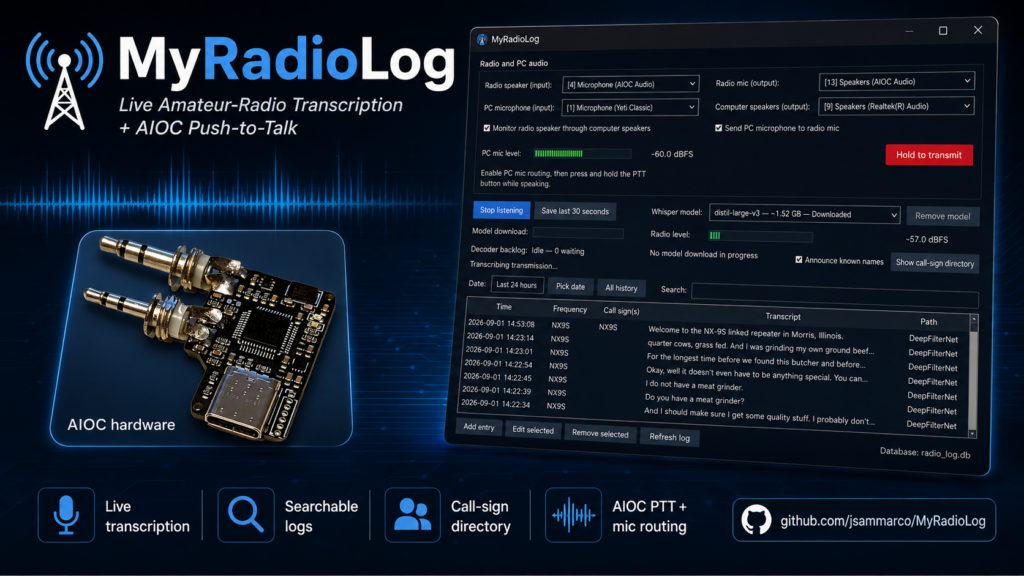
The main listening view combines audio device selection, radio and PC-mic levels, AIOC push-to-talk, frequency/model controls, decoder status, and the searchable transcript log.

The application also includes a call-sign directory for keeping operator names and usual frequencies alongside the live log.

AIOC hardware
For the computer-to-radio audio and PTT connection, I used the AIOC Ham Radio All-in-One Cable. I bought and soldered the less-expensive DIY version, saved $10, and found the assembly straightforward. MyRadioLog uses the AIOC HID interface to key PTT1 from the on-screen button while the selected PC microphone is routed to the radio-mic output.
Get the project
The code, installation instructions, requirements, and current release materials are available on GitHub:
github.com/jsammarco/MyRadioLog
To run the application from source, clone the repository, create a Python environment, install requirements.txt, and launch radio_gui.py. The project README includes the full setup and operating instructions.



0 Comments