If you spend any time working with Flipper Zero Sub-GHz captures, you quickly run into the same problem: getting a raw .sub file is easy, but understanding what is actually happening inside the pulse stream takes much more work.
That is why I built Flipper Sub-GHz RAW Analyzer, a desktop GUI for inspecting, decoding, comparing, and recoding Flipper Zero RAW Sub-GHz capture files.
The project is available on GitHub here: jsammarco/flipper-subghz-analyzer
Why I Built It
Flipper Zero makes it easy to capture Sub-GHz signals, but once you have a RAW file, the next steps are usually very manual. You end up staring at long lists of timing values, trying to guess frame boundaries, testing whether the signal is pulse-width encoded, and comparing repeated button presses by hand.
That process is doable, but it is slow.
I wanted a tool that could take the raw capture and make the reverse-engineering process more visual and interactive:
- split a long capture into likely repeated frames
- estimate short and long timing clusters automatically
- try multiple decode strategies against the same packet
- compare repeated transmissions to identify fixed and changing regions
- edit decoded messages and recode them back into pulse data
- save the result back out as a Flipper-compatible
.subfile
The goal was not to build a one-click “protocol identifier.” The goal was to make analysis faster, clearer, and much less tedious.
What the Analyzer Does
The app is a Python desktop GUI built with Tkinter and the standard library, so it is simple to run and easy to modify.
Once you load a Flipper Zero RAW .sub file, the analyzer can:
- detect likely frame boundaries by looking for long negative gaps
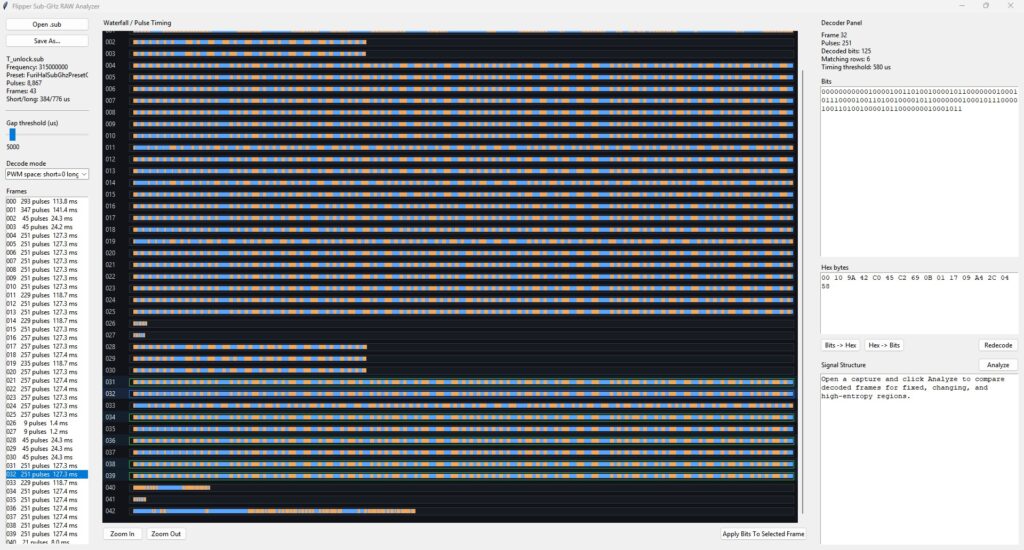
- visualize each frame in a waterfall-style timing view
- decode the same pulse train using multiple strategies
- show decoded bits and hex side by side
- highlight matching frames so repeated packets stand out
- analyze multiple aligned frames to infer likely structure
- let you modify the decoded bitstream
- rebuild the selected frame from your edited message
- save the updated pulse data as a new
.subfile
That last part is one of the features I wanted most for my own workflow: not just decoding a message, but being able to change it and recode it back into a signal for testing.
Decode, Compare, and Recode
One of the hardest parts of working with raw Sub-GHz captures is figuring out whether you are looking at:
- a fixed-code signal
- a packet with a mostly fixed device ID and a small command field
- a rolling-code style transmission
- a format with a trailing checksum or status region
The analyzer helps with this by comparing repeated decoded frames and classifying each bit position by how often it changes. From there, it can highlight regions that look like:
- preamble or sync
- fixed header fields
- device ID or serial regions
- command or button bits
- rolling or authentication blocks
- CRC, checksum, or tail fields
This is intentionally heuristic. It is not pretending to “know” the protocol just from one capture. What it does do is point you toward the parts of the message worth investigating first.
Then, once you have a good decode mode selected and a packet that makes sense, you can edit the decoded bits directly and recode the frame into a new pulse sequence. That makes it much easier to experiment with controlled changes instead of rebuilding pulse timings manually.
Why the GUI Matters
There are plenty of ways to parse signal data with scripts, but signal analysis gets easier when you can actually see patterns.
The waterfall view makes repeated transmissions easy to scan. Matching-frame highlighting makes duplicates obvious. The decode panel lets you move quickly between raw pulse timings, bits, and hex. The structure analysis gives you a practical first pass at separating stable fields from variable ones.
For this kind of work, visual feedback saves time.
Who This Is For
This project is useful for people who:
- capture Sub-GHz signals with Flipper Zero
- reverse engineer simple RF remotes or sensors
- compare repeated button presses to identify message structure
- experiment with protocol research and replay testing in controlled environments
- want a lightweight desktop tool instead of a pile of one-off scripts
It is especially useful early in the process, when you are trying to answer questions like:
- Where does each frame begin and end?
- Which decode mode makes the most sense?
- Which bits stay fixed?
- Which bits change between transmissions?
- Can I modify the decoded message and rebuild the signal cleanly?
Built to Stay Simple
I kept the implementation intentionally lightweight:
- Python
- Tkinter
- standard library only
- no third-party dependencies
That keeps the project approachable if you want to inspect the code, extend the decoder logic, or adapt it to your own RF workflow.
Final Thoughts
Flipper Zero is great at capturing signals. The hard part starts after that, when you need to interpret and experiment with what you captured.
This project is meant to help bridge that gap by making raw Sub-GHz captures easier to inspect, compare, edit, and recode.
If you work with Flipper RAW files and want a faster way to explore what is inside them, take a look at the project here:
jsammarco/flipper-subghz-analyzer
As always, use tools like this responsibly and only with devices and signals you own or are authorized to analyze.

0 Comments