When you’re iterating quickly with tools like Codex, one friction point becomes obvious: you have to keep looking at the screen to understand what it’s doing.
That’s fine—until you’re multitasking, reviewing another monitor, or just want a more ambient, assistive workflow.
In this guide, we’ll wire up real-time speech output so Codex can literally tell you what it’s doing as it edits your project.
Step 1 — Launch Codex with Debug Access
To instrument Codex, you need access to both:
- the main process (Node/V8)
- the renderer (Chromium UI)
Launch Codex with:
"C:\Program Files\WindowsApps\OpenAI.Codex_26.313.5234.0_x64__2p2nqsd0c76g0\app\Codex.exe" --remote-debugging-port=9222
What this does:
--remote-debugging-port=9222 → exposes the renderer process to Chrome DevTools
Step 2 — Attach Chrome DevTools
Open Chrome and go to:
chrome://inspect
Then:
- Click “Configure” and ensure
localhost:9222is listed - You should see Codex appear under Remote Target
- Click Inspect or Inspect Fallback
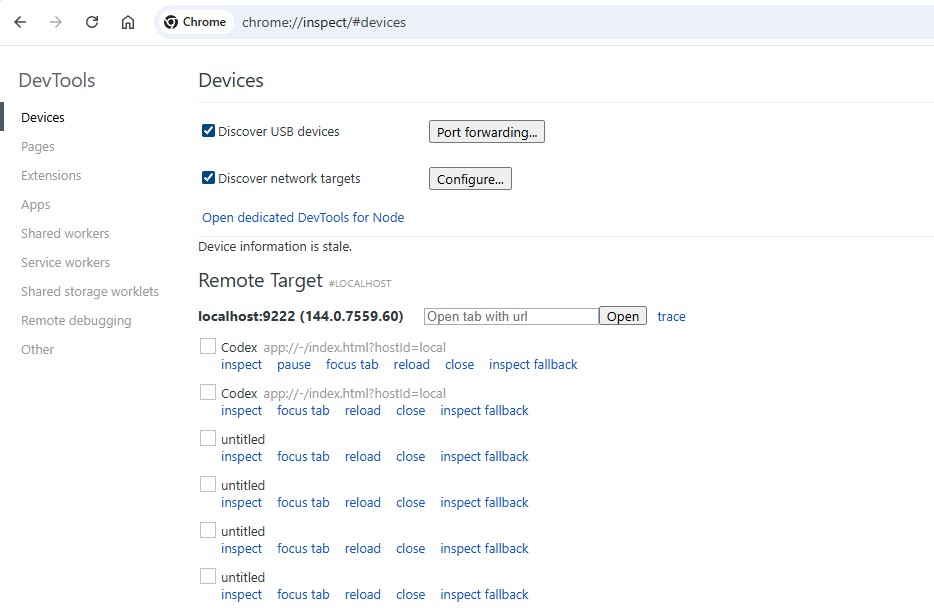
Now you’re inside the Codex UI runtime.
Step 3 — Identify the Output Stream
Codex (like ChatGPT-style interfaces) typically renders output in streaming paragraphs. In this case, we target:
p.text-size-chat.leading-relaxed
These are the nodes that update as Codex generates code or explanations.
Step 4 — Add Speech Synthesis
We’ll use the browser’s built-in Web Speech API (speechSynthesis) to read content aloud.
Core speaking function:
function speak(text) {
  if (!text) return;  window.speechSynthesis.cancel();  const utterance = new SpeechSynthesisUtterance(text);
  utterance.lang = 'en-US';
  window.speechSynthesis.speak(utterance);
}
Step 5 — Wait for Streaming to Finish (Critical)
Codex streams text incrementally. If you speak immediately, you’ll get broken sentences.
Instead, we wait until the paragraph stops changing.
Full working implementation:
const selector = 'p.text-size-chat.leading-relaxed';
const STABLE_DELAY_MS = 3000;
let stableTimer = null;
let contentObserver = null;
let currentTargetEl = null;
let lastSpokenText = '';
function speak(text) {
  if (!text) return;  window.speechSynthesis.cancel();
  const utterance = new SpeechSynthesisUtterance(text);
  utterance.lang = 'en-US';
  window.speechSynthesis.speak(utterance);
}function scheduleStableRead(el) {
  if (stableTimer) clearTimeout(stableTimer);
  stableTimer = setTimeout(() => {
    const text = el.textContent.trim();
    if (!text) return;
    if (text === lastSpokenText) return;
    lastSpokenText = text;
    speak(text);
  }, STABLE_DELAY_MS);
}function attachToParagraph(el) {
  if (!el || el === currentTargetEl) return;
  currentTargetEl = el;
  if (contentObserver) {
    contentObserver.disconnect();
  }  contentObserver = new MutationObserver(() => {
    scheduleStableRead(el);
  });  contentObserver.observe(el, {
    childList: true,
    subtree: true,
    characterData: true
  });  scheduleStableRead(el);
}function findLatestParagraph() {
  const all = document.querySelectorAll(selector);
  return all[all.length - 1] || null;
}const pageObserver = new MutationObserver(() => {
  const latest = findLatestParagraph();
  if (latest) attachToParagraph(latest);
});pageObserver.observe(document.body, {
  childList: true,
  subtree: true
});// Initialize
const initial = findLatestParagraph();
if (initial) attachToParagraph(initial);
Step 6 — Enable Audio (Chrome Requirement)
Chrome requires a user interaction before audio playback.
Run this once in the console:
speak("Voice enabled");
Or bind it to a click:
document.addEventListener('click', () => {
  speak("Voice enabled");
}, { once: true });
What You Get
Once wired up, Codex will:
- Speak completed thoughts after generating them
- Wait until output stabilizes (no half-sentences)
- Avoid repeating the same content
- Track the latest active message automatically
Practical Use Cases
This becomes surprisingly powerful:
1. Passive Monitoring
Let Codex run while you:
- review code elsewhere
- check logs
- handle Slack/email
2. Accessibility Layer
Voice output acts as a lightweight screen reader for AI output.
3. Faster Iteration Loops
You don’t have to visually parse every response—just listen for intent.
4. “Pair Programming” Feel
It starts to feel like Codex is narrating its reasoning in real time.
Optional Enhancements
Queue instead of interrupt
// Remove cancel()
window.speechSynthesis.speak(utterance);
Change voice
const voices = speechSynthesis.getVoices();
utterance.voice = voices.find(v => v.name.includes('Google'));
Increase delay for long outputs
const STABLE_DELAY_MS = 3000;
Final Thoughts
This is a small hack with outsized impact.
You’re not modifying Codex itself—you’re augmenting its runtime behavior through the renderer layer.
That’s the key idea:
Treat AI tools like programmable interfaces, not fixed products.
Once you start doing this, you can extend Codex (and similar tools) in ways that match your workflow, not the other way around.



0 Comments