If you’ve ever worked with USB relay boards and wanted a simple, reliable way to control them from your computer, DSTUR-Relay offers a powerful yet lightweight solution. Created by Joe Sammarco, this open-source tool provides both a command-line interface and an optional GUI for managing USB relay hardware — especially useful for makers, hobbyists, and automation enthusiasts.
What Is DSTUR-Relay?
DSTUR-Relay is a cross-platform command-line relay control tool designed to interact with USB relay boards such as the DSTUR-T20 (2-relay) and compatible units. Built primarily in Python, this utility allows you to:
- Detect available serial/COM ports
- Read detailed port information
- Control relays (on/off/pulse)
- Query the status of individual relays
All without needing complex setups or vendor-specific software. GitHub
Get them from Amazon / Walmart:
– 2 Relay Board (DSTUR T-20): *https://www.walmart.com/ip/Relay-Module-2-Channel-USB-to-CH340-Serial-Control-Relay-Module-Optocoupler-Protection-TYPEC-Interface-Module-DSTUR-T20/9266407451
– 4 Relay Board (DSTUR T-40):
*https://www.walmart.com/ip/Relay-Module-4-Channel-USB-to-CH340-Serial-Control-Relay-Module-Optocoupler-Protection-TYPE-C-Interface-Module-DSTUR-T40/8832108080
*https://www.amazon.com/USB-C-Module-Optocoupler-Isolation-Control/dp/B0D7BKQTNS
– 8 Relay Board (DSTUR T-80): Cannot find these anymore
Why You Might Use It
Whether you’re automating a workshop device, building a home lab, or integrating relay control into larger systems, DSTUR-Relay makes it straightforward to send commands to USB relay boards from scripts, terminal sessions, or other tools. It’s especially helpful when you want:
- Automation via scripts
- Remote control over USB devices
- System integration without proprietary software
- Cross-platform support (Windows, Linux, macOS)
Core Features
Here’s a quick breakdown of what DSTUR-Relay can do:
Serial Port Listing
DSTUR-Relay detects all attached serial ports and provides detailed outputs, including VID/PID, manufacturer, model, hardware ID, and address. You can format the port list in plain, CSV, or JSON formats — making it easy to integrate with other software. GitHub
Relay Control
Using intuitive commands, you can directly interact with relays:
- Turn relays ON or OFF
- Send a PULSE command for a specified duration
- Control individual relays or all at once
Example usage:
python relay.py relay 1 on
python relay.py all pulse --seconds 5
This flexibility allows precise control over connected hardware. GitHub
Relay Status Queries
Need to check whether a relay is currently active? DSTUR-Relay provides status checks for single relays or all connected relays with optional raw hex output for low-level debugging. GitHub
Graphical Interface (Optional)
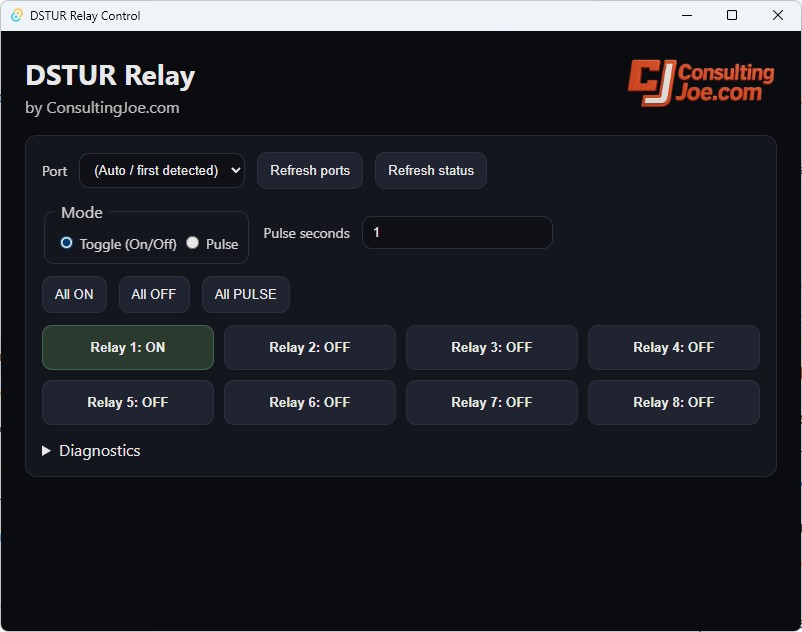
If the command line isn’t your preferred interface, DSTUR-Relay also includes a GUI built with Tauri (Rust) and modern web technologies (HTML/CSS/JS). The GUI wraps the command-line executable, giving you a desktop experience while maintaining the full power of the underlying CLI tool. GitHub
Getting Started
Requirements:
- Python 3.8+
pyserialpackage- (For GUI) Node.js + npm, Rust toolchain, Tauri CLI GitHub
Installation:
python -m pip install -r requirements.txt
From there, you can begin using the tool directly in your terminal or build/run the GUI for a more visual experience.
Compatibility and Hardware Support
While originally tested with the DSTUR-T20 two-relay USB board, DSTUR-Relay is designed to support other DSTUR hardware like the T10 single-relay board. If the hardware has more relays (up to eight), the tool will still work — unused relays simply won’t respond. GitHub
Open Source and Licensing
DSTUR-Relay is open source and licensed under the MIT License, making it easy to adapt, extend, or integrate into your own projects. GitHub
Conclusion
Whether you’re integrating low-cost USB relay boards into automation scripts or building a hardware control dashboard, DSTUR-Relay provides a straightforward and extensible foundation. Check out the full source code and documentation on GitHub to get started: