As part of my ongoing collection of nerdy side projects, I recently wanted something surprisingly simple:
A way to visually see the tone frequencies coming from my police scanner.
If you’ve ever listened to scanners or radio systems, you know they sometimes emit tones—alert tones, paging tones, system tests, station call-outs, and so on. I wanted to see those tones:
- What exact frequency are they?
- What musical note do they correspond to?
- Could I visualize them live as a waveform?
I didn’t really search around for tools that offered real-time frequency detection, note mapping, and a live waveform, because I knew everything I would find would be bloated, paid software (prove me wrong).
So, I did what I usually do:
I built it myself.
And now I’m releasing it free and open-source.
GitHub repository:
👉 https://github.com/jsammarco/Audio-Frequency-Detection
What I Built
This project is a lightweight Python application that:
✔ Captures live audio from any microphone
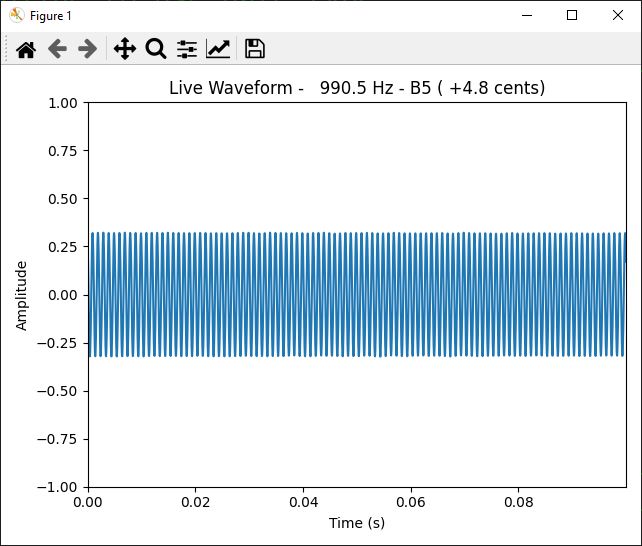
✔ Shows a real-time waveform (oscilloscope-style)
✔ Runs an FFT on each audio block to find the dominant frequency
✔ Converts the frequency into a musical note (A4, C#5, etc.)
✔ Displays the note + cents deviation live in the window title
If a tone hits 440 Hz, you’ll see:
Live Waveform – 440.0 Hz – A4 (+0.0 cents)
If a scanner paging system uses a 1000 Hz test tone, you’ll immediately see its exact frequency and the musical note nearest to it.
This tool works with:
- Police scanners
- Radios / ham receivers
- Instruments
- Microphones
- Any audio source you can route to your computer
And it updates continuously and in real time.
Why I Wanted It
Police and emergency radio systems often use specific tones, sometimes in pairs, for alerting stations or signaling events.
I wanted to:
- Identify paging tones
- Compare tones across channels
- Log tones for research
- Understand the musical relationships between alerts
- Experiment with decoding tone-based systems
While this tool isn’t intended to decode two-tone paging (like A/B tones), it’s perfect for frequency identification and experimentation.
And honestly… there’s something satisfying about seeing a scanner tone instantly translate into something like:
1047.1 Hz – C6 (+2.9 cents)
How It Works (The Simple Version)
Here’s the magic behind the curtain:
1. Audio Capture
Using the sounddevice library, the app captures small audio blocks (2048 frames) from your microphone at 44.1 kHz.
2. FFT Processing
Each block is windowed with a Hanning filter and passed into a real FFT.
The peak magnitude bin gives the dominant tone.
3. Frequency Conversion
The bin index becomes a frequency:
freq = peak_index * samplerate / block_size
4. Note Mapping
The frequency is mapped to a musical note using the standard MIDI formula:
midi = 69 + 12 * log2(freq / 440)
Which then converts neatly to note names like A4, C#5, G3, etc., along with the cents offset for accuracy.
5. Real-Time Waveform Display
Matplotlib shows a scrolling waveform updated in real time, giving you a visual oscilloscope.
How to Use It
1. Install the dependencies:
pip install sounddevice numpy matplotlib
2. Run the app:
python live_tone_scope.py
3. Play audio near your microphone:
- Police scanner
- Radio
- Test tone generator
- Musical instrument
- Your own whistle—anything
You’ll see:
- A live waveform
- The current dominant frequency
- The musical note mapping
- Cents deviation from perfect pitch
Close the window to stop the program.
What You Can Use This For
This project has tons of practical (and fun) applications:
✔ Police scanner tone identification
See exactly what frequencies your local departments use for station alerts.
✔ Musical tuning & pitch checking
Use it as a live tuner for instruments.
✔ Radio system analysis
Check the consistency and stability of RF alert tones.
✔ Speech and signal analysis
Identify pitch patterns in sounds or voice.
✔ Learning FFT & DSP basics
It’s a great educational tool for understanding real-time audio processing.
✔ Experimentation & hacking projects
Perfect if you’re researching tone-based systems or reverse-engineering signaling tones.
Completely Free. Completely Open Source.
This isn’t a commercial tool.
There’s no license fee, no locked features, and no restrictions.
I built it because I needed it, and now I’m sharing it because others might too.
📂 GitHub Repo:
https://github.com/jsammarco/Audio-Frequency-Detection
If you find it useful, feel free to fork it, improve it, and contribute back.
Pull requests are welcome.
Final Thoughts
Sometimes the best tools come from simple needs.
I wanted a way to see scanner tones in real time—and now the project has grown into a handy audio analysis toolkit.
If you’re into:
- Scanners
- Audio engineering
- DSP
- Ham radio
- Musical tuning
- Or just fun Python projects
…this tool might become one of your favorites.