A question about an old TV on my home network turned into a Python project that
can discover its browser debugger and put an animated Matrix GIF over a running
app. Then I added support for sending a meme from a local file or web URL,
base64-encoded, directly to the TV.
I did not install custom firmware or obtain a root shell. The interesting part
was discovering how much access an already-exposed web-app debugger provided.
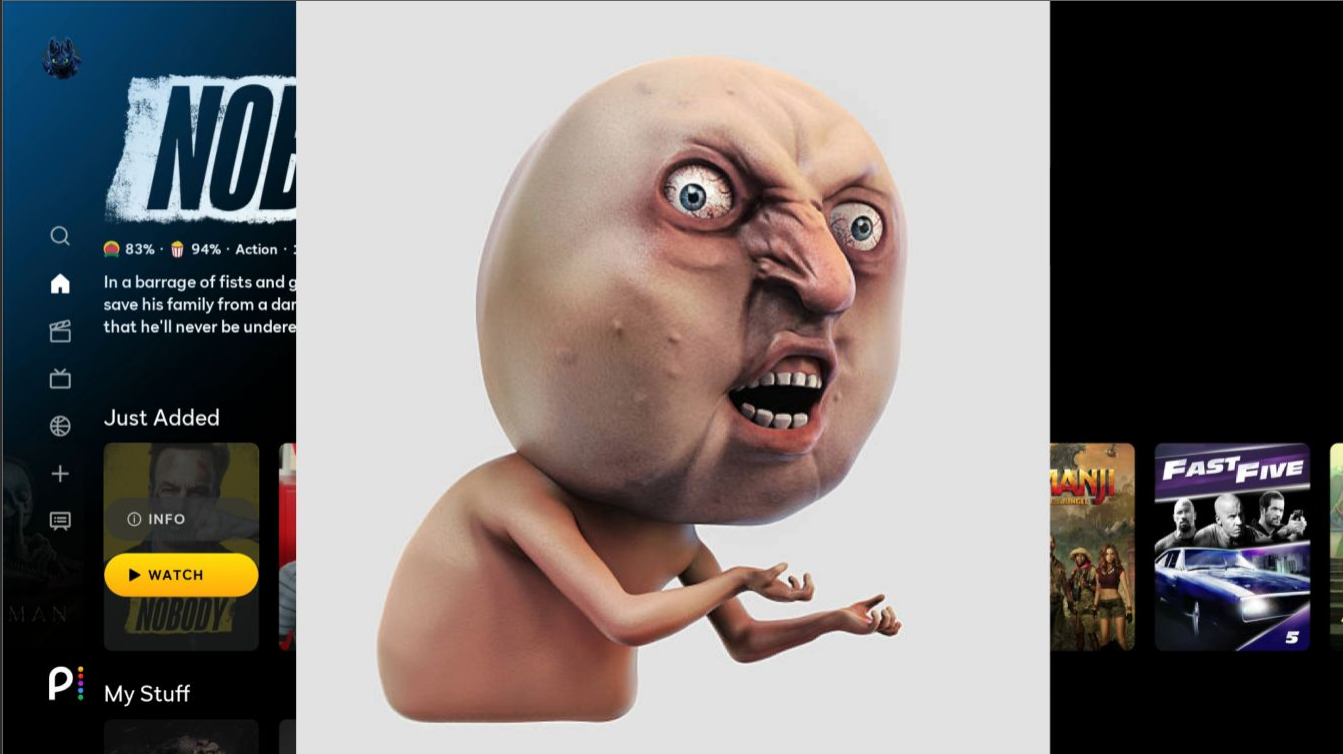
The app remains underneath. The image is a temporary element added to its page.
It started with network discovery
The device was a Vizio V505-G9 running firmware 2.600.596.0-10. SSDP discovery
and device-information requests identified it, and a TCP scan found the usual
collection of smart-TV services: AirPlay, Google Cast, the SmartCast control API,
and a Netflix MDX endpoint.
One less ordinary result was an HTTP service on a high-numbered port. Its page
identified itself as Conjure remote debugging, and its target list advertised
a Vizio web-player page.
That was the turning point. This was a browser debugging endpoint, rather than
another opaque service that merely accepted a TCP connection.
Chrome DevTools could connect to it. Later, launching Paramount+ and Peacock
exposed debugging targets for those apps, too. I could inspect the page, read
console messages, and observe network activity. Read-only JavaScript queries
also returned TV state, including whether it was on and whether Quick Start was
enabled.
The port kept disappearing
An app exit or restart could break the connection. A new scan might find the
debugger on a completely different port with a different target ID.
My first scanner was thorough but inconvenient: scan every TCP port, wait for
the inventory to finish, and then inspect the open services. One run took about
four and a half minutes. That is a long wait when the app you want to inspect
may have restarted again.
The faster version checks cached ports first, searches high ports before lower
ones, and checks open ports for DevTools metadata immediately. Once it finds a
real inspectable target, it stops. A complete fast search took about 57 seconds
in one comparison. Some successful searches finished in a few seconds. Those
are measurements from my network, not promised runtimes.
Watch mode checks an active debugger and searches again when it disappears:
python rediscover_devtools.py --host YOUR_TV_IP --watch --openI also added --replay to repeat the original discovery and status requests
before each new search. That let me test whether contacting another service was
what made the debugger appear.
So far, those requests have not reliably brought it back. We have observed
debuggers for individual apps and the Vizio video player, while a static home
menu has sometimes exposed none. That supports an app/runtime-lifecycle
explanation, but it does not establish the exact trigger. The script discovers
existing debugging services; it does not contain a confirmed enable command.
Browser access has boundaries
The TV’s companion library connects the app to device functionality. That made
it tempting to assume every method visible in the library would work.
Testing showed otherwise. Power-state queries succeeded, but an input-list
query was explicitly rejected as unavailable to partner apps. A method being
present in JavaScript is not proof that the current app may use it.
There are also different levels of access here. Inspecting a web app, changing
its DOM, using a supported TV-control API, and executing Linux commands are
separate capabilities. I confirmed the first two and built tooling for normal
PIN-paired control. I have not established a root shell or general OS command
execution through this work.
From a debugger to an image overlay
The visual experiment was deliberately simple: add an image element to the
running page and give it fixed positioning, 100% viewport height and width,object-fit: contain, and a high CSS z-index. Pointer events pass through so
the image does not intercept clicks.
The first version used a remote image URL. Then I tried an animated GIF as
base64. The GIF itself was valid, but raw base64 is not yet an image source: it
needs a data-URL prefix such as data:image/gif;base64,.
The script now detects supported image signatures and builds that prefix
automatically. It supports GIF, PNG, JPEG, and WebP. Encoding preserves the
original bytes, including GIF frames and transparency.
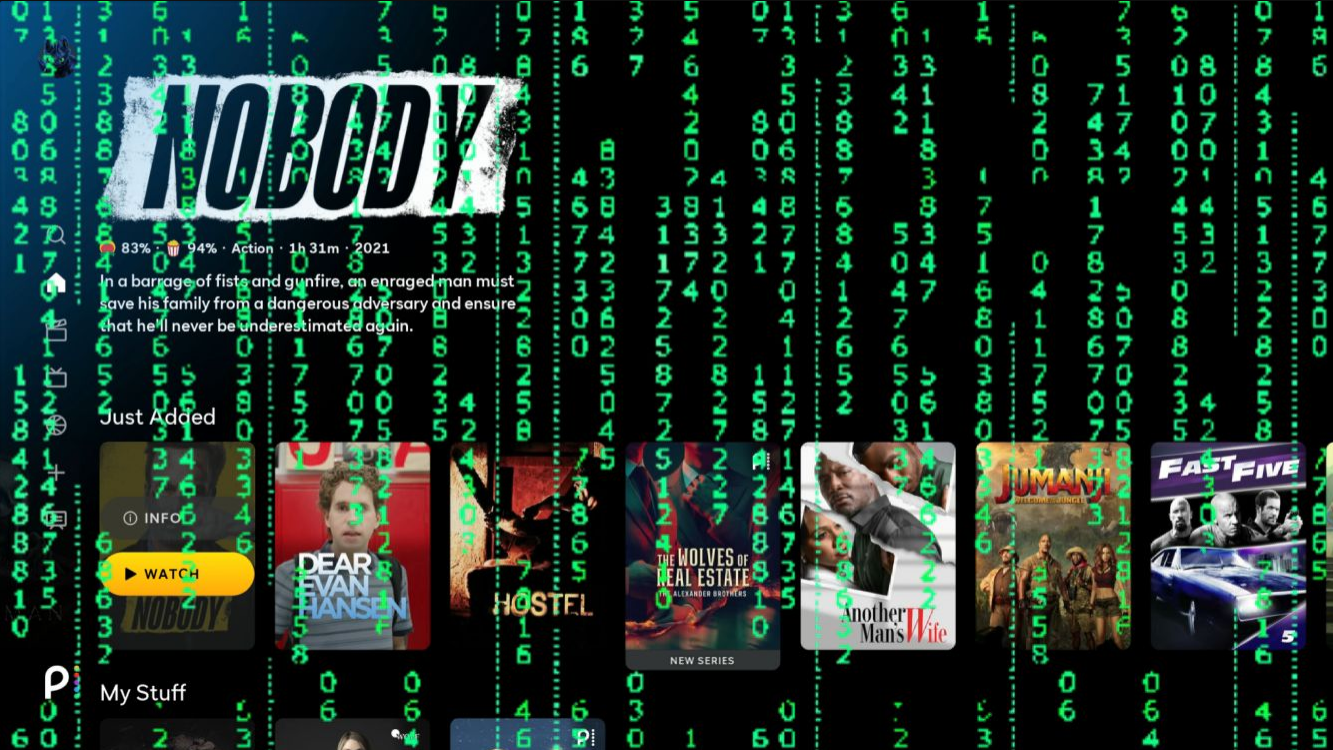
An animated Matrix GIF overlay, captured over the app interface.
Sending the image without opening Chrome
meme_img_plug.py reuses the scanner, retrieves the current page target, and
connects directly to its DevTools WebSocket. It sends a Runtime.evaluate
command to create the overlay, waits for the image-loading result, and returns
the element’s dimensions. It does not need a Chrome window.
For a local file:
python meme_img_plug.py --host YOUR_TV_IP --image-file "C:\Pictures\matrix.gif"For a web image:
python meme_img_plug.py --host YOUR_TV_IP --image-url "https://example.com/meme.gif"The URL path now downloads the image on the computer, validates its format,
base64-encodes it, and sends the resulting data URL inline to the TV. The TV
does not fetch the original image host. Downloads have a size limit, and HTTPS
certificate validation stays enabled for those web requests.
The overlay is temporary. It disappears when the page reloads or the app exits,
and it has an explicit removal command:
python meme_img_plug.py --host YOUR_TV_IP --removeA high CSS z-index controls normal page stacking; it does not guarantee drawing
over native video planes or browser top-layer elements. Page image policies can
also block a data URL. The screenshot demonstrates a successful overlay in the
tested app state, not universal control over every pixel the TV displays.
What I would investigate next
The unresolved question is what starts and stops the debugger. A controlled
comparison of standby, static Home, preview playback, and individual app starts
would be more useful than assuming every newly found port explains the cause.
The security boundary also matters. In my setup, an unpaired computer on the
home network could discover exposed targets and execute JavaScript in the
inspected page. That deserves attention even without an OS-level exploit. I
have not tested internet exposure or established which other firmware versions
behave the same way.
I have kept pairing credentials, debugger caches, device reports, and console
exports out of the public repository. App logs can include authentication
material, so posting a raw console dump is a different decision from sharing
source code and a screenshot.
The resulting project, VizioControl, includes normal TV controls, the faster
discovery/watch tool, and the image-overlay script. It currently has 27 passing
unit tests, plus the live discovery and overlay checks described above.
The meme was a visible demonstration of the finding. The more useful result was
learning to measure what the debugger actually exposed, preserve the distinction
between browser and OS access, and build a repeatable tool around a changing
runtime.
0 Comments